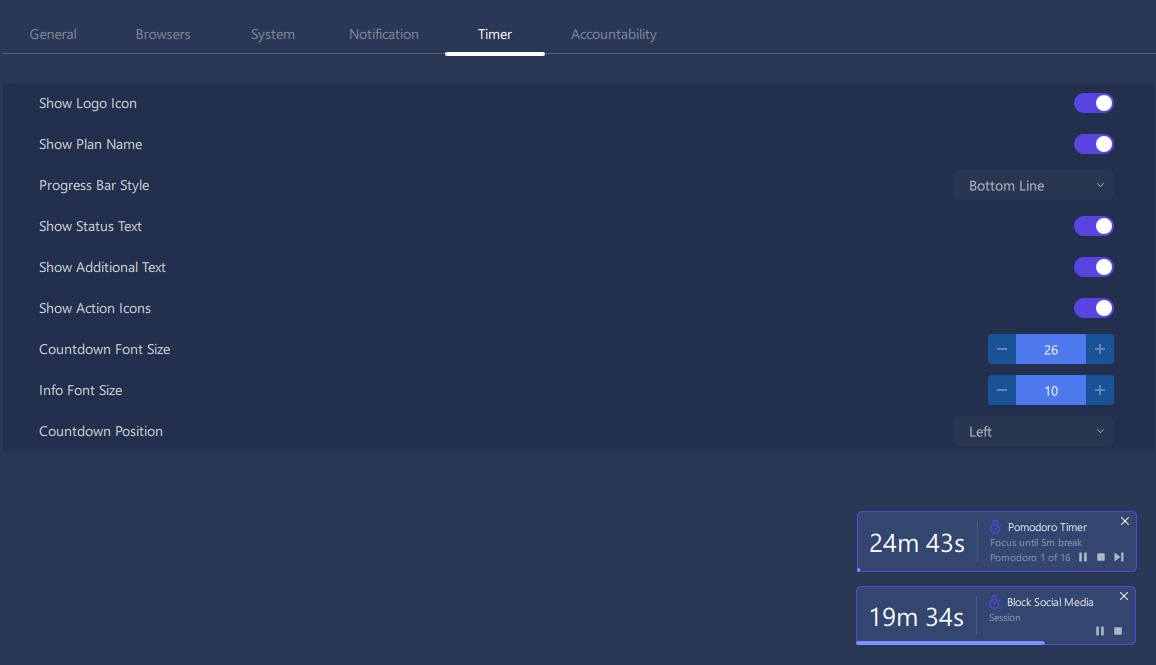
I think there could by some UI improvements for the timer.
Suggestions:
Make the countdown time the largest easiest to see text. This is the main thing I want to be able to glance at. Possibly add a visual for the count down. E.g. the background colour swipes from left to right like a progress bar. background colour is different for a work or a break in Pomodoro. Or have a line at the bottom that progresses.
There is a lot of wasted space. Recommend removing the FocusMe logo (This is the largest element and hogs screen real-estate). Reduce the size of the plan name (or even only show this on hover or something.
Don’t have trailing text after the count down time. It moves all the trailing text and is a distraction. E.g. current Pomodoro timer has, e.g. “10m 42s focus until 5m break” with each second change the trailing text moves it’s position on the screen. E.g. 10m 41s focus until 5m break”, moves the “focus until 5m break” left on the screen and then the next second back right again.
Pomodoro settings:
Allow option that is NOT continuous/ auto-start: Add a feature that requires user input to advance the pomodoro timer. E.g. After a work session a user presses a button to confirm advancing to a break. Also at the end of a break user confirms to commence a work session.
Be able to quickly add an amount of time to a work session or pause a work session. E.g. right click on time and can at X amount of minutes.
Be able to right click on the timer and skip to a work session or restart the work session.
Could have a beast mode that restarts the work session if a blocked site is accessed.
Thanks so much for taking the time to share such a detailed list of suggestions! We really appreciate the thought you’ve put into improving both the timer interface and the Pomodoro experience.
We’ve shared your suggestions with the team for consideration, especially:
A larger, more glanceable countdown timer with visual progress indicators.
A cleaner layout with less visual clutter, reduced text movement, and better use of screen space.
Optional manual advancement between work and break sessions.
Quick controls for extending, pausing, restarting, or skipping work sessions.
A stricter “beast mode” that restarts the current work session after attempting to access blocked content.
Thanks again for your thoughtful feedback. We really appreciate you helping us make FocusMe even better!
This is fantastic! I have been testing out the new timer upgrades over the weekend and it has been a huge improvement for me! Thank you! I love how the timer is customisable so it can be adapted to individual preferences.
A few extra points of feedback:
In a Pomodoro plan if I right click on an active timer it shows a menu with options “add 5 minutes, add 10 minutes”. However clicking on these options doesn’t seem to affect the timer.
In a pomodoro plan it would be great if there was an option to pause the timer during a work session, but not pause the blocking. E.g. if someone comes in and interrupts my work session I would ideally want to pause the timer (but keep the blocking running) and then be able to resume the timer after. I however don’t want to be able to pause a ‘break’ session.
It would be great if the Pomodoro, ‘wait for user’ feature worked. It doesn’t seem to do what I would expect (using windows 11). Ideally I would like the workflow to be: 1) User starts Pomodoro plan. The ‘work/focus’ session runs, at the end of the ‘work/focus’ session it requires the user to press a button to confirm continuing on to a break session (but keep the blocking in place until I confirm the start of a break). This would be beneficial because sometimes I am focused on a work task and spending 5 extra mins or so is super productive…but then it overruns my break time. 2) After confirming to proceed to a break the ‘Break’ session runs. At the end of the break session the blocking automatically starts, but it asks the user to confirm before the work session timer starts. This means that if I am late to restart work I am not incentivised for this. If that explanation doesn’t make sense let me know and I can try and explain it better.
Once again thank you for taking on my previous feedback and implementing upgrades so quickly. It has been a huge productivity improvement for me.
Just two suggestions: I like to have the timer on, but I shove it from right to left to top to bottom because he always covers something on the screen. Could you add the possibility to integrate the timer into the taskbar?
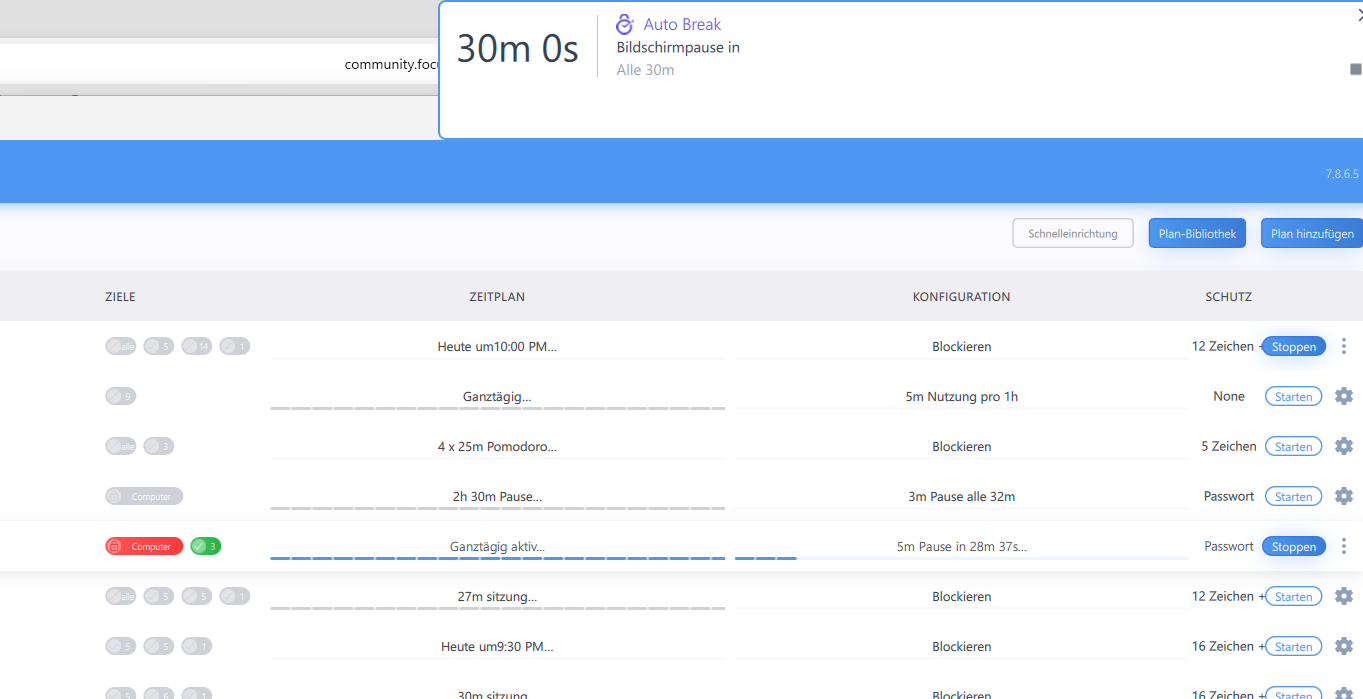
And sometimes when my laptop was in idle mode, the timer gets stuck on restart (stops to count, weird layout) - although Focusme continues to work just fine. (The problem solves itself the moment the timer restarts.)
Glad that the improved timer is working well for you! As for your suggestions, we completely hear you and yes, those are good points. About the timer getting stuck, will investigate this further for you. Would you be open to reporting it directly to our support and share us a video recording? Maybe on your phone?
I just made a screenshot for you. You can see: The timer window is much too large. It cannot be closed, clicking on the x has no effect. And it shows constantly 30 min 0 s, while Focusme correctly shows 28 min.
That is what happens sometimes when my laptop was in sleep mode with the timer running and I wake it up.